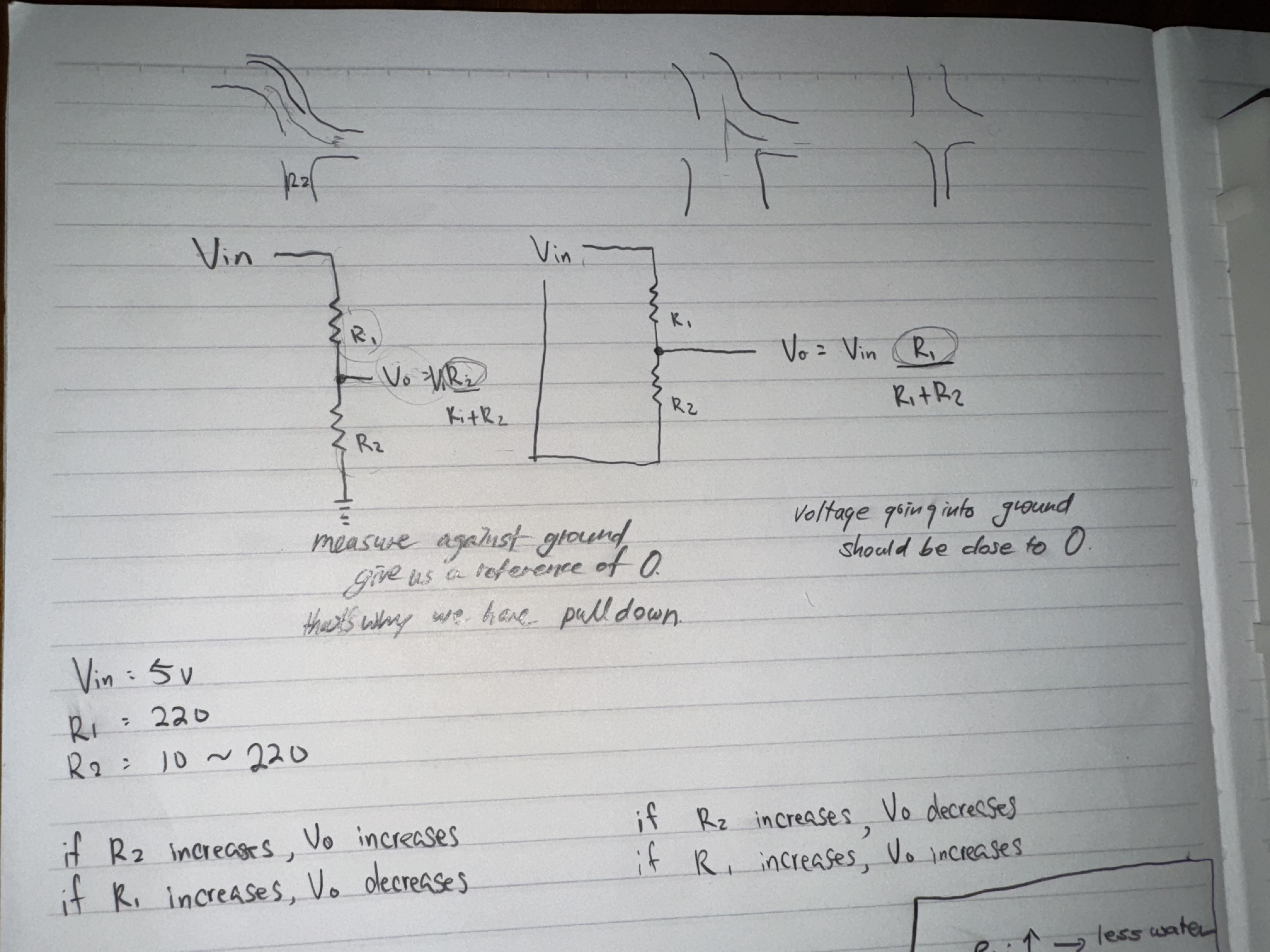
 take away from this week’s Analog In and Out Review Questions :
- always measure voltage against the ground.
- ground gives us the reference of 0V since voltage going into the ground should be close to 0.
- and that’s why we have pull down resistor.
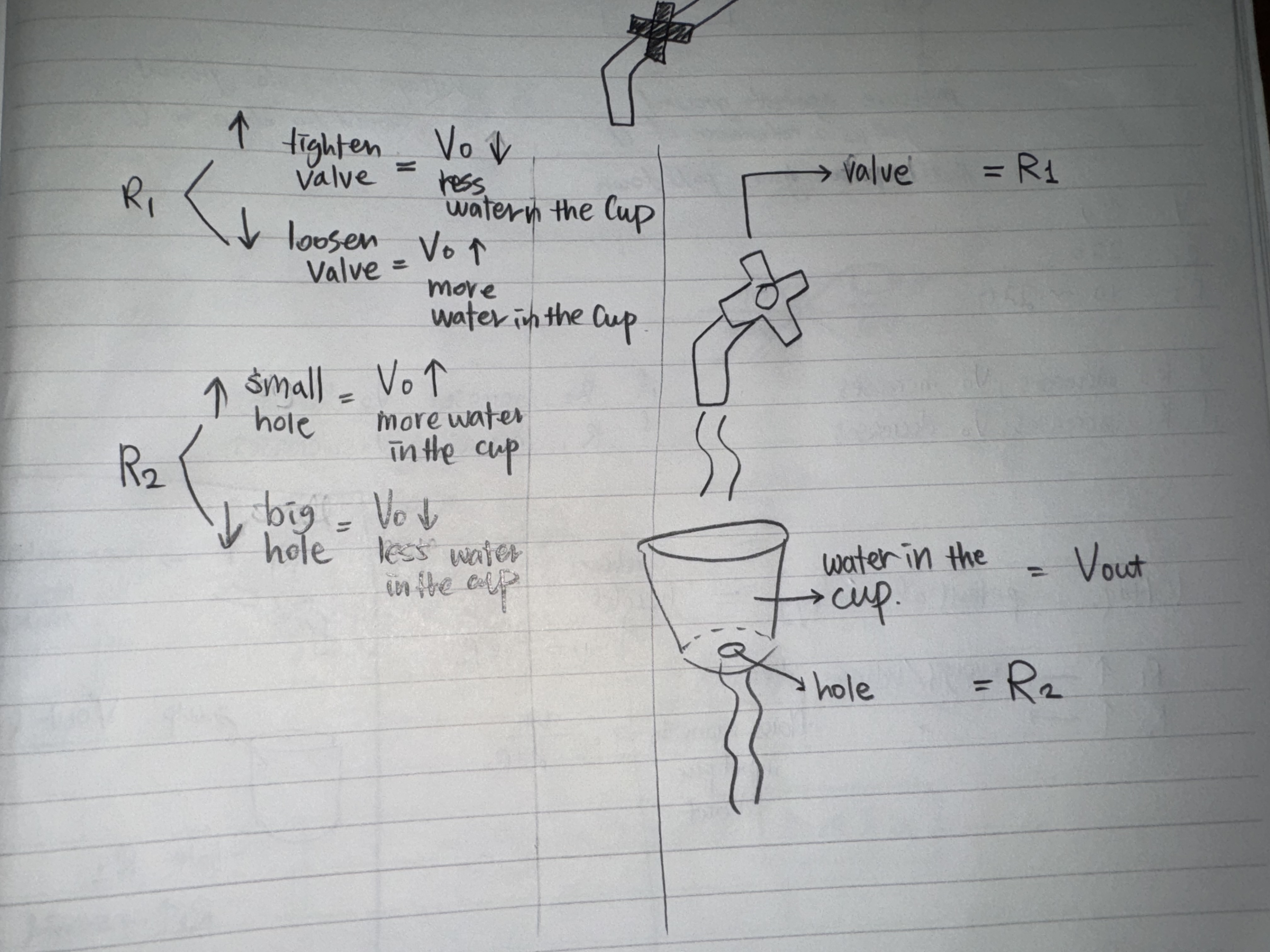
William and I were confused at first about the relationship between R1 and Vout, R2 and Vout, and why when R1 increases Vout decreases, but when R2 increases Vout increases.
And at the end William had a great water metaphor that instantly made so much sense.
Also we reviewed last week’s video of Pseudo-analog output:
https://vimeo.com/380180086?fl=pl&fe=sh

void setup(){
pinMode(11, OUTPUT);
}

void loop(){
for (byte pwmVal = 0; pwmVal <= 255; pwmVal++){
	analogWrite(11, pwmVal);
	delay(10);
	}
}
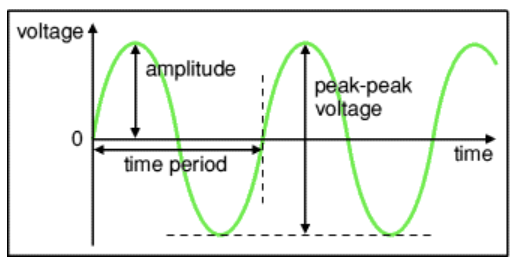
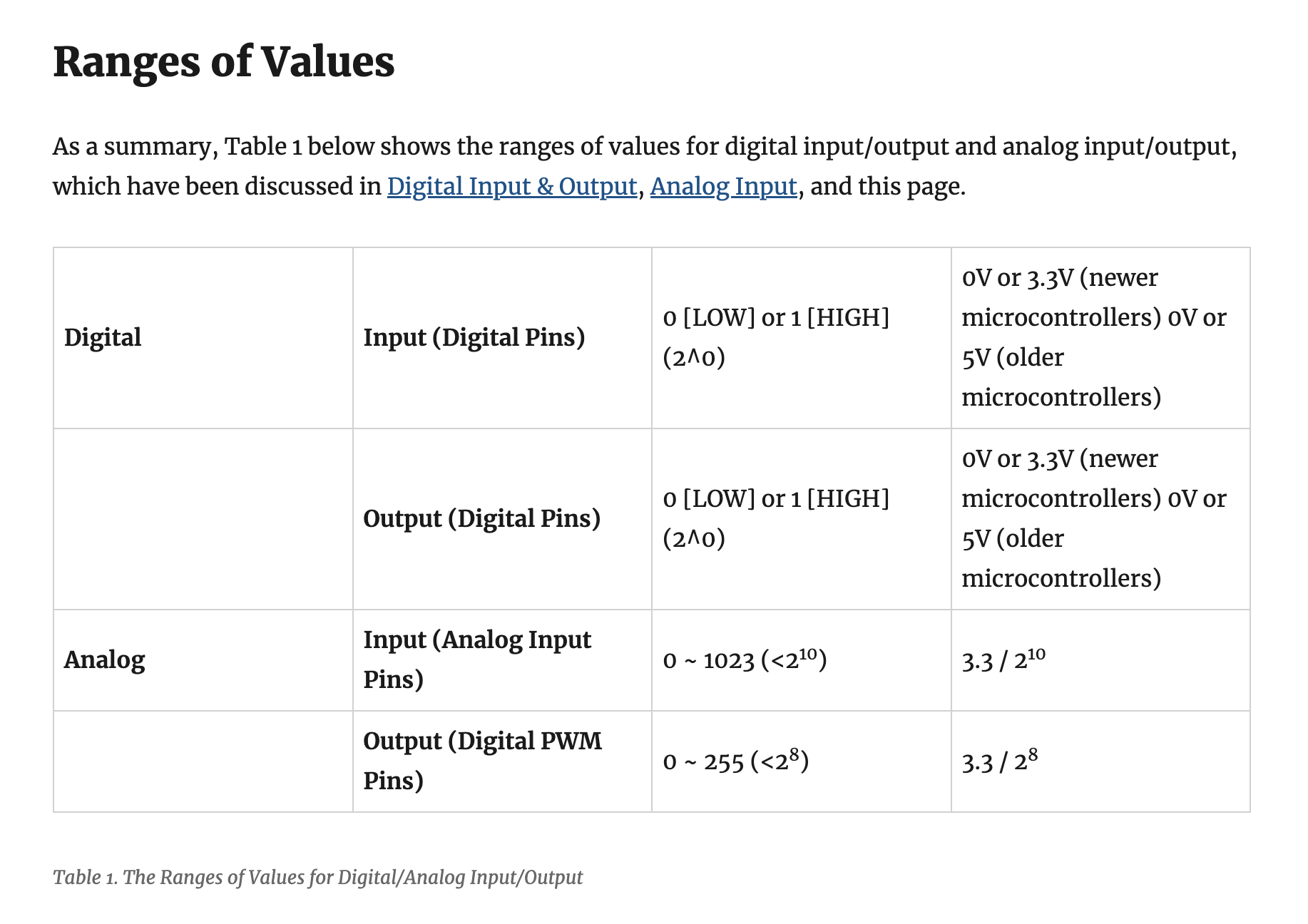
0-255(8 bit) : a number to represent the percentage of time that the wave should spend on or off.
PWM controls the width of the pulse with the analogWrite() command. 0 to 255 meaning LED going from dim to bright.
tone(); is a frequency control, or the space between adjacent waveforms.
(also we were curious if pwmVal could affect the speaker tome and if tone could affect the LED brightness but realized that won’t work. )
void setup(){
pinMode(11, OUTPUT);
}

void loop(){
tone(11, 400, 500);
//tone(pin, frequency, duration);
delay(2000);
}
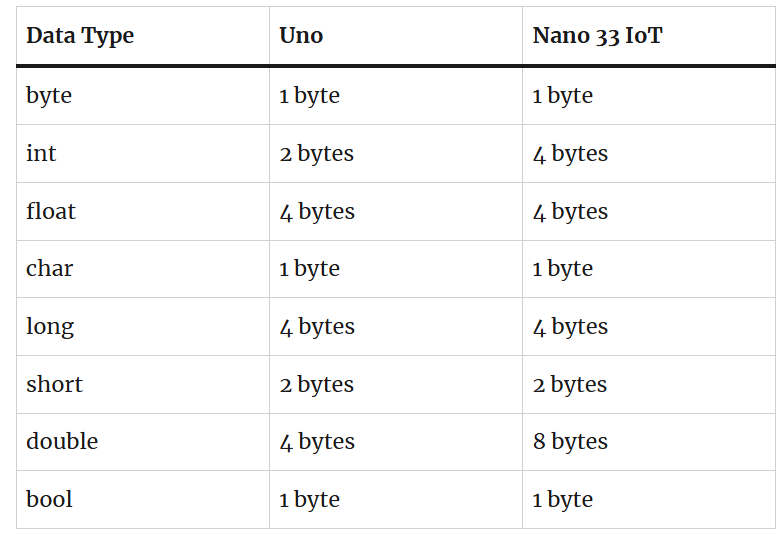
Labs : Variables
https://itp.nyu.edu/physcomp/lessons/variables/
Wk4 Labs
https://itp.nyu.edu/physcomp/labs/labs-arduino-digital-and-analog/lab-sensor-change-detection/
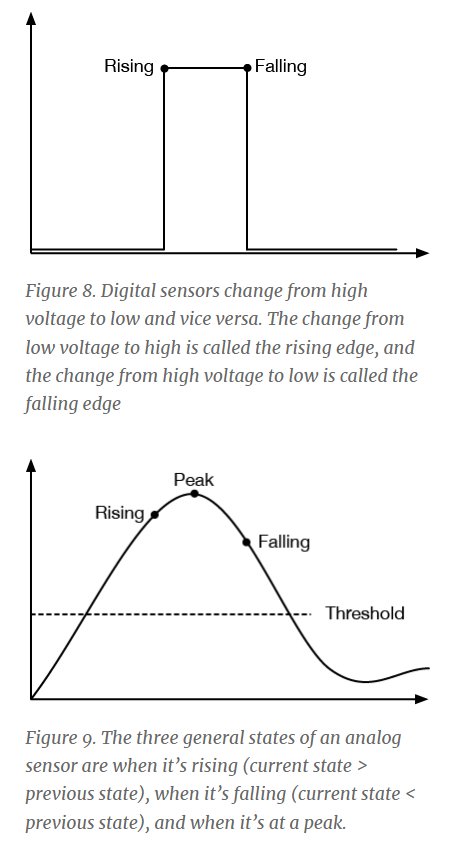
In this lab, you’ll learn how to program your microcontroller to look for three common changes in sensor readings that give you information about events in the physical world: state change detection on digital sensors, and threshold crossing and peak detection on analog sensors.
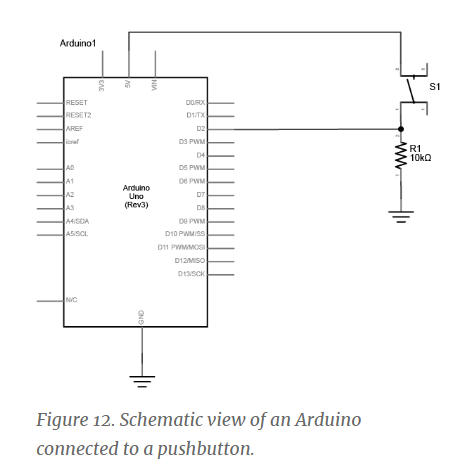
Program the Microcontroller to Read the Pushbutton’s State Change
int lastButtonState = LOW;

void setup() {
   Serial.begin(9600);
   pinMode(2, INPUT);
}


void loop() {
  int buttonState = digitalRead(2);
  if (buttonState != lastButtonState){
      if (buttonState == HIGH) {
        Serial.println("Button was just pressed.");
      }
  }
  lastButtonState = buttonState;
}
Count Button Presses
int lastButtonState = LOW; //state of button last time you checked

int buttonPresses = 0; // count of button presses

void setup() {
   Serial.begin(9600);
   pinMode(2, INPUT);
}

void loop() {
  int buttonState = digitalRead(2);
  if (buttonState != lastButtonState){
      if (buttonState == HIGH) {
        buttonPresses++;
        Serial.println("Button was just pressed.");
        Serial.print(buttonPresses);
        Serial.println("times");
      }
  }
  lastButtonState = buttonState;
}
Long Press, Short Press
int lastButtonState = LOW; //state of button last time you checked
int buttonPin = 2; //the input pin

//the length of the presses in ms:
int longPress = 750;
int shortPress = 250;
long pressTime = 0; //variable for how long the user actually presses

void setup() {
  //initialize serial and I/O pin:
   Serial.begin(9600);
   pinMode(buttonPin, INPUT);
}

void loop() {
  //read the button:
  int buttonState = digitalRead(buttonPin);

//if the button has changed:
  if (buttonState != lastButtonState){
      if (buttonState == HIGH) {
        pressTime = millis();
      }
      //if it's released, stop the timer:
      if (buttonState == LOW){
        long holdTime = millis() - pressTime;
        if (holdTime > longPress){
          Serial.println("long press");
        } else if (holdTime > shortPress){
          Serial.println("short press");
        } else {
          Serial.println("Tap");
        }
      }
  }
  lastButtonState = buttonState;
}
Analog Sensor Threshold Detection
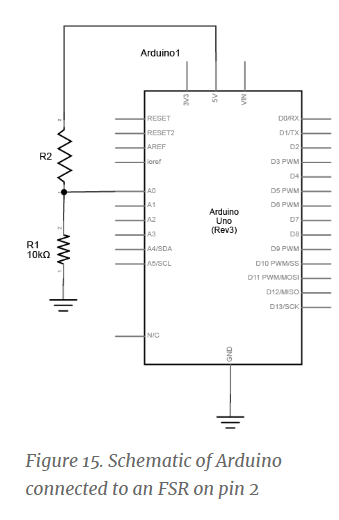
Program the Microcontroller to Read a Sensor Threshold Crossing
int lastSensorState = LOW; //sensor's previous state
int threshold = 100; //an arbitrary threshold value

void setup() {
   Serial.begin(9600);
}

void loop() {
  int sensorState = analogRead(A0);
  if (sensorState >= threshold){
    if (lastSensorState < threshold){
      Serial.println("Sensor crossed the threshold");
    }
  }

  lastSensorState = sensorState;
}
Detecting a Peak Peak is when an analog sensor reaches its highest value in a given time period. To detect a peak, you first set an initial peak value at 0.Pick a threshold below which you don’t care about peak values. Any time the sensor value rises above the peak value, you set the peak value equal to the sensor value. When the sensor value starts to fall, the peak will remain with the highest value:
int peakValue = 0;
int threshold = 50;

void setup() {
   Serial.begin(9600);
}

void loop() {
  int sensorValue = analogRead(A0);
  if (sensorValue > peakValue){
    peakValue = sensorValue;
    Serial.println(peakValue);
  }
}
Dealing with Noise You can smooth out the noise and ignore some of these local peaks by adding in a noise variable and checking to see if the sensor’s change is different than the previous reading and the noise combined
int peakValue = 0;
int threshold = 50;
int noise = 5;

void setup() {
   Serial.begin(9600);
}

void loop() {
  int sensorValue = analogRead(A0);
  if (sensorValue > peakValue){
  peakValue = sensorValue;
  }

  if(sensorValue <= threshold - noise){
    if (peakValue > threshold + noise){
      //you have a peak value:
      Serial.println(peakValue);
      //reset the peak value:
      peakValue = 0;
    }
  }
}