https://editor.p5js.org/hh3683/sketches/o43SNce9l
For our final project, we were inspired by the nyc subway station mosaic style tiles, so we created an interactive piece where we transform the image detected from camera to a mosaic style image.
Guy handled the design and the visual of the piece. I handled the interactive part of the piece.
// ----- 1. SETUP: Loading the Hand Detection Model -----
let handPose; // This will hold our hand detection model
function preload() { // Load the ml5 HandPose model before anything else runs // ml5.js is a beginner-friendly machine learning library
handPose = ml5.handPose(); }
function setup() { // Start detecting hands in the video // When hands are found, call the gotHands() function
handPose.detectStart(video, gotHands);
}
I used ml5.js especially handPose model to detect hands in the camera, and find the hand in the video and track 21 keypoints on each hand.
// ----- 2. STORING HAND DATA -----
let hands = []; // Array of all detected hands
let handKeypoints = []; // 21 points on the hand (fingertips, joints, etc.)
let handBBox = null; // Bounding box around the hand
When model detects the hand, gotHands() funciton stores all the hand keypoints and calculates the bounding box.
// ----- 3. CALLBACK: What happens when hands are detected -----

function gotHands(results) {

  hands = results;   // store them in the global 'hands' array


  if (hands.length > 0) {

    let hand = hands[0];               // we only care about one hand

    let keypoints = hand.keypoints;    // ml5 gives 21 keypoints


    handKeypoints = [];  // reset


// Track the boundaries of the hand
    let minX = Infinity;

    let minY = Infinity;

    let maxX = -Infinity;

    let maxY = -Infinity;


// Loop through all 21 keypoints
    for (let kp of keypoints) {

      // coords are already in video space (no flip option used)

      let x = kp.x;// X position in video

      let y = kp.y;// Y position in video


      handKeypoints.push({ x, y });


// Update bounding box
      if (x < minX) minX = x;

      if (y < minY) minY = y;

      if (x > maxX) maxX = x;

      if (y > maxY) maxY = y;

    }


// Add padding around the hand
    const pad = 20;

    handBBox = {

      minX: minX - pad,

      minY: minY - pad,

      maxX: maxX + pad,

      maxY: maxY + pad

    };

  } else {
// No hands detected - clear everything
    handKeypoints = [];

    handBBox = null;

  }

}
When your hand enters the LEFT border:
- The system checks if enough hand keypoints (at least 35% or 3 points) are inside the left border area
- If YES and the hand wasn’t there before → randomly pick a new color palette!
This creates a “swipe” gesture - wave your hand through the left border to cycle through 8 different color schemes.
let wasHandInUpperLeft = false;  // Track previous state
let wasHandInUpperRight = false;
let rightBorderFrames = 0; // Count frames in border
const rightBorderThreshold = 5; // Wait 5 frames before triggering


// Check if hand is in upper right corner area

function isHandInUpperRight() {

  if (!handBBox || handKeypoints.length === 0) return false;


  // Defensive: if video dimensions aren't ready yet, bail out

  if (!video || !video.width || !video.height) return false;


  // Canvas region where the video mosaic is drawn (before mirroring)

  let videoStartX = leftBorderWidth;

  let videoEndX = width - rightBorderWidth;


  // The visible upper-right square on SCREEN (in screen coords)

  let squareLeft = width - rightBorderWidth;

  let squareRight = width;

  let squareTop = 0;

  // For full-right-border trigger, the vertical extent is the whole canvas

  let squareBottom = height;


  // Map each keypoint from VIDEO -> canvas -> screen and count how many

  // fall inside the visible upper-right square.

  let insideCount = 0;

  for (let kp of handKeypoints) {

    let canvasX = map(kp.x, 0, video.width, videoStartX, videoEndX);

    let canvasY = map(kp.y, 0, video.height, 0, height);


    // Apply the same horizontal mirror used by draw() so we get screen coords

    let screenX = width - canvasX;

    let screenY = canvasY;


    if (screenX >= squareLeft && screenX < squareRight && screenY >= squareTop && screenY < squareBottom) {

      insideCount++;

    }

  }


  const minFraction = 0.35; // 35% of keypoints

  const minCount = 3;       // but at least 3 keypoints

  return (insideCount >= minCount) || (insideCount / handKeypoints.length >= minFraction);

}
When your hand enters the RIGHT border:
- Similar detection, but with a twist - I added a debounce timer
- Your hand needs to stay in the right border for 5 frames (about 1/6 of a second)
- This prevents accidental triggers
- When triggered → randomly change the tile size from 8-17 pixels!
The Coordinate Mapping Challenge
This was tricky! The hand coordinates come from the video space, but I need to check if they’re in the screen space (after the video is mirrored and positioned with borders).
So I had to:
- Map from video coordinates → canvas coordinates
- Mirror horizontally (since the video flips like a mirror)
- Check if the result lands in my border zones
The Problem: Three Different Coordinate Systems
We have THREE different “worlds” with their own coordinate systems:
1. VIDEO SPACE (what the camera sees)
   - Origin (0,0) at top-left of video
   - Size: video.width × video.height

2. CANVAS SPACE (where we draw)
   - Origin (0,0) at top-left of canvas
   - Size: width × height
   - Has borders on left and right!

3. SCREEN SPACE (what you see - mirrored!)
   - Same size as canvas
   - But FLIPPED horizontally (mirror effect)

// Step 1:

Video → Canvas
canvasX = map(50, 0, 640, 100, 900) = 162 pixels
canvasY = map(100, 0, 480, 0, 600) = 125 pixels

// Step 2:

Canvas → Screen (flip!)
screenX = 1000 - 162 = 838 pixels ← Now it's on the RIGHT side!
screenY = 125 pixels

// Step 3:

Check if in left border (0 to 100)
if (screenX >= 0 && screenX < 100) { // Is 838 in this range?
// No! Not in left border }
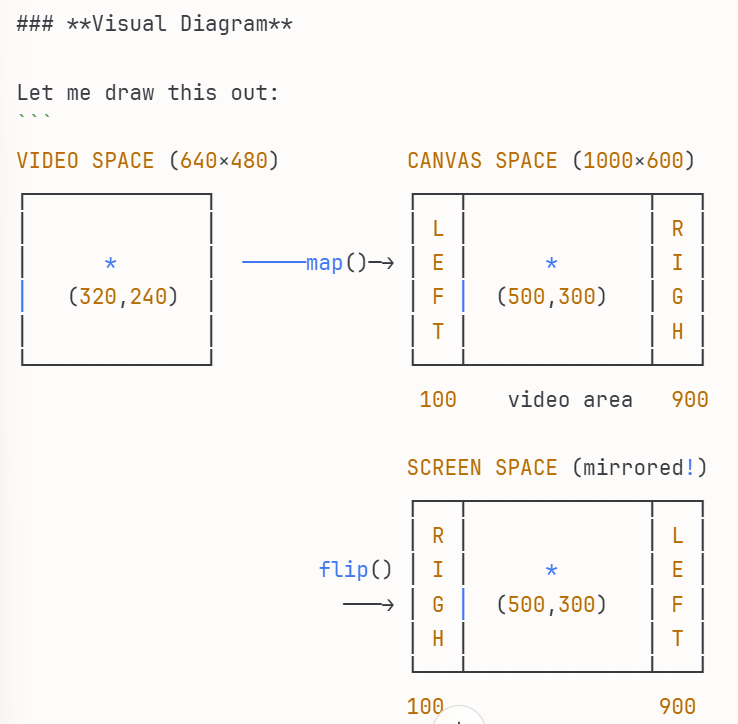
When checking if a hand is in the left border, we need to know:
- Is the hand’s screen position between 0 and 100 pixels from the left?
But the hand data comes in video coordinates! So we must transform:
- Video coords → Canvas coords (to account for borders)
- Canvas coords → Screen coords (to account for mirroring)